We accept USD, EUR, PLN and 19 other currencies
Seamless communication in English and Polish
We always meet deadlines - no more dragging projects

Custom web application for a network of medical centers

Medbill for OpenMed: sales, cash desk, settlements with doctors and the website price list in one panel

As the OpenMed Group grew, so did the number of changes to its clinics' websites: every new price or doctor meant a request to IT. We built Medbill, a custom web application for a network of medical centers, where the OpenMed team records sales, runs the cash desk, settles with doctors and updates the website price list and doctor profiles. Staff now add a price or doctor themselves, in a minute.

In that time we have delivered a whole range of projects together, from websites, through systems that support the day-to-day operations of our clinics, to a portal for issuing medical documents.
Karol Sierpatowski, Board member

/ Project facts

Client

OpenMed Group

Industry

Technologies

Scope of work

workshops user scenarios system architecture UI design sales module cash desk module settlements with doctors website integration Azure cloud deployment maintenance

Results

  • up to 50 %

    higher team operational efficiency

  • 99.98 %

    system availability (uptime)

  • up to 30 %

    lower IT team costs

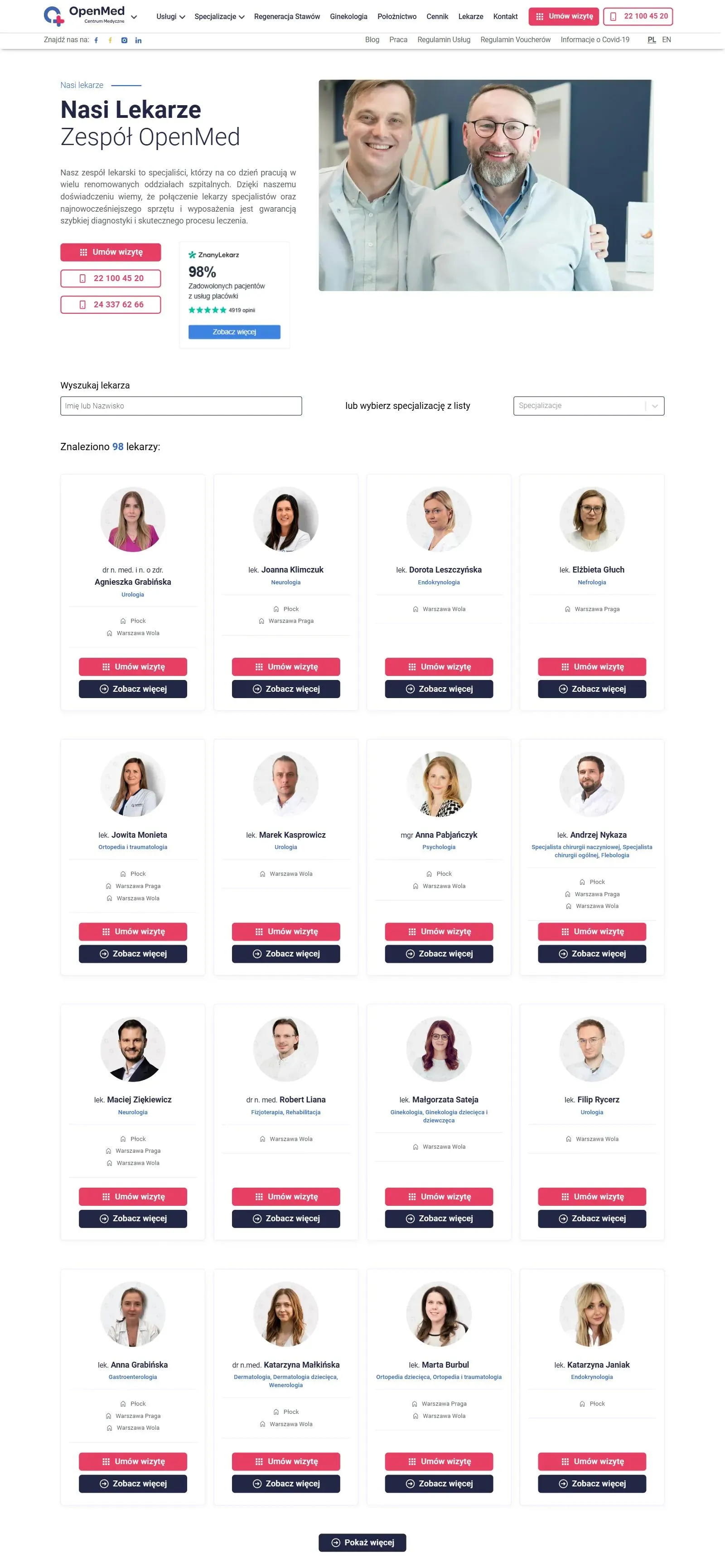
Doctors page on openmed.pl: doctor search and cards with a photo, specialty, clinics and a booking button
Adding a new doctor to this list no longer needs a ticket to the IT department. The OpenMed team fills in the profile in Medbill, in all language versions at once, and clicks "Update openmed.pl".

/ 01 problems and challenges

More doctors, services and websites meant more work for administration and the IT department

The OpenMed Group runs medical centers in Warsaw and Płock. Patients can choose from over 40 specialties, and the group employs over 100 doctors. At that scale OpenMed needed a custom web application for a network of medical centers: one system for sales, the cash desk, settlements with doctors and the content of the clinics' websites.

The number of patients kept growing, and with it the number of doctors, specialties and services. The group maintained several websites with a price list and doctor profiles. Every price change, new doctor or new specialty meant a request to the IT department, and as the offer grew, so did the number of those requests. Settlements with doctors and sales control took administration more and more time, and the cost of managing the network kept rising.

What had to be solved

  • An up-to-date price list and doctors on the clinics' website: staff make the changes themselves, without the IT department.
  • Sales, cash desk and settlements with doctors: receipts, cash balance and commissions from the system instead of manual calculations.
  • One source of data for all clinics: the front desk, administration and management all work from the same database.

/ 02 our process and modules

First we got to know the clinics, then we planned the modules

We designed and launched Medbill together with the group's team, step by step:

  • Workshops and meetings with the OpenMed team
    We learned how the clinics work day to day and what gave the team the most trouble. Only then did we start planning features.
  • Feature list and user scenarios
    We wrote down the system's features and the working scenarios of each type of user, from the front desk to management. That told us who would use each module and what for.
  • Architecture that fits the budget
    We planned the architecture to fit OpenMed's budget without blocking future growth. We left room in it for integrations with external systems.
  • Development in stages
    From the start Medbill was meant to grow in stages, as the group's needs evolved. We add new modules without rebuilding the whole system.

The front desk records sales and the system settles with doctors

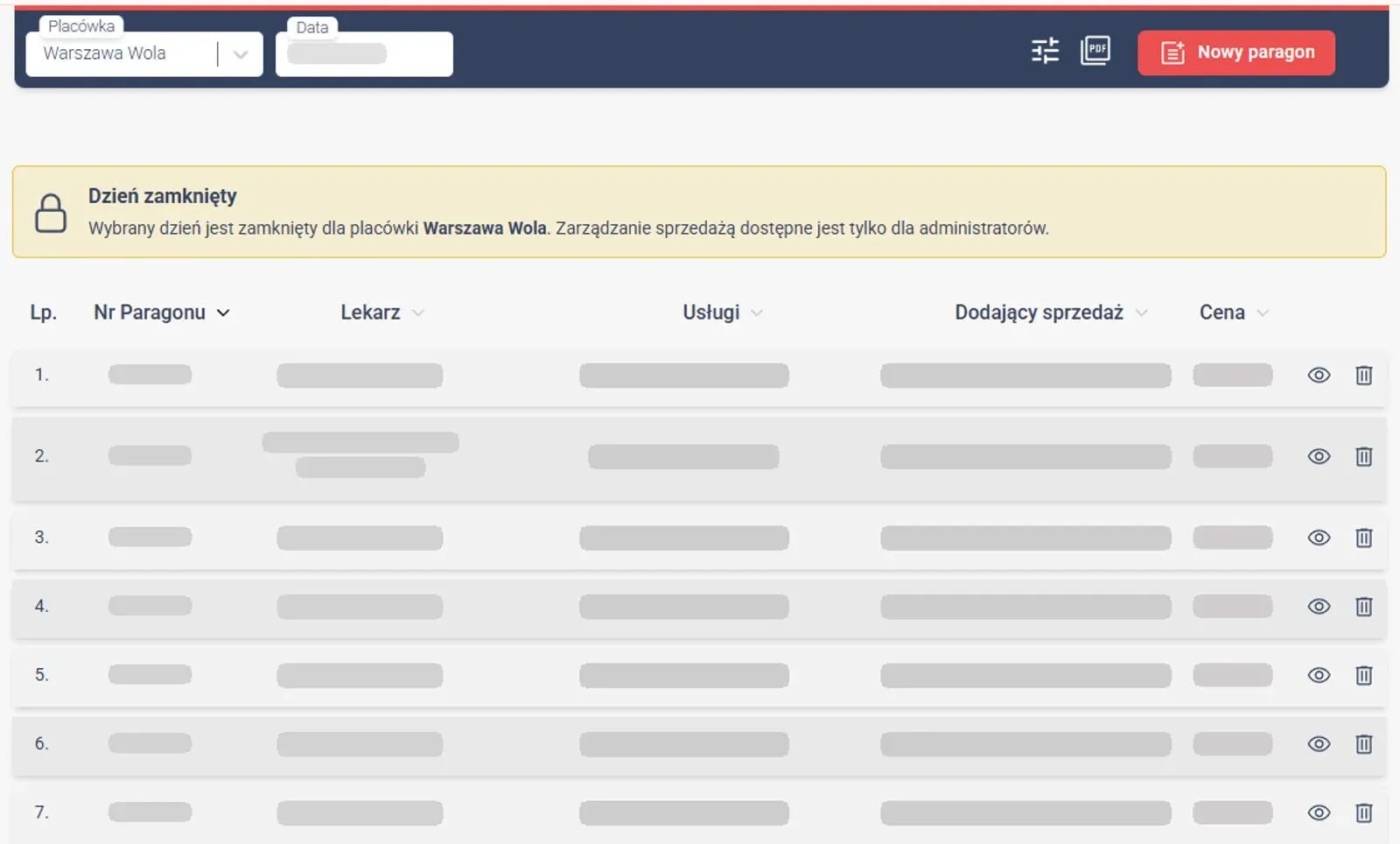
At every visit the front desk adds a receipt in Medbill with the doctor, services and price. The sales list shows all receipts for the chosen clinic on a given day, each with the person who added it. Once the day is closed, only administrators can change the sales, so the settlement data doesn't change after the fact. Management tracks sales results in the panel from the same data, in real time.

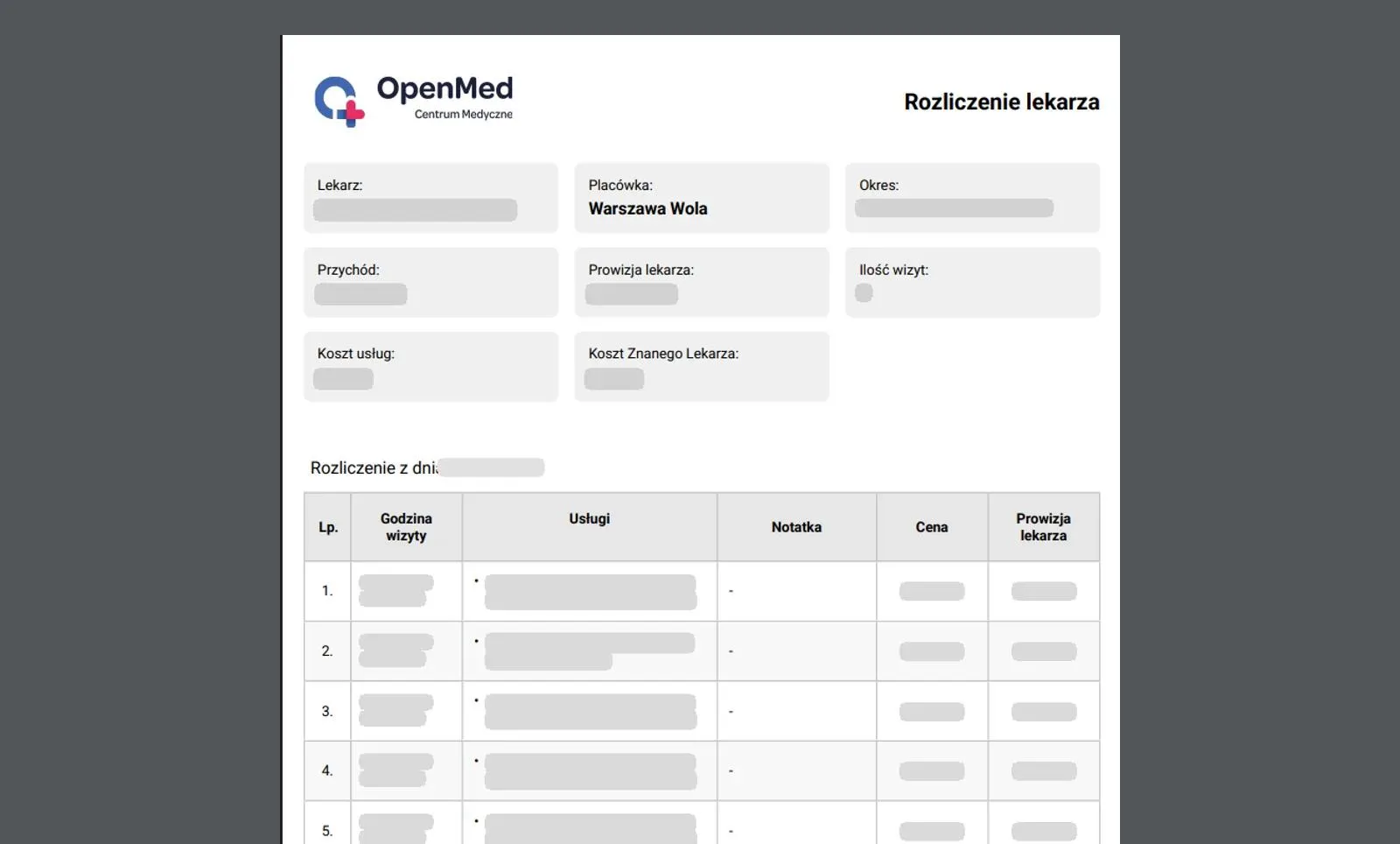
The sales data also produces a doctor's settlement for a chosen period. Every service has a commission rate, so the system calculates the doctor's amount on its own and lists the visits day by day, with the time of each one. The top of the settlement shows revenue, commission, number of visits, and the costs of services and ZnanyLekarz, and the system saves the whole thing as a PDF.

These settlements used to be done by hand. Now the system calculates them, so the administration department saves time on them and the risk of errors is lower.

The cash desk module shows how much cash each clinic has on hand

The team runs each clinic's cash desk in the same panel as sales. The current cash balance is at the top, with the transactions for a chosen period below, grouped by day. Payments from sales go into the cash desk automatically as cash receipt documents (KP), while payouts and other deposits are added by staff with the "Cash paid out" and "Cash received" buttons. As a result the cash balance updates along with sales, and a statement for any period can be downloaded as a PDF.
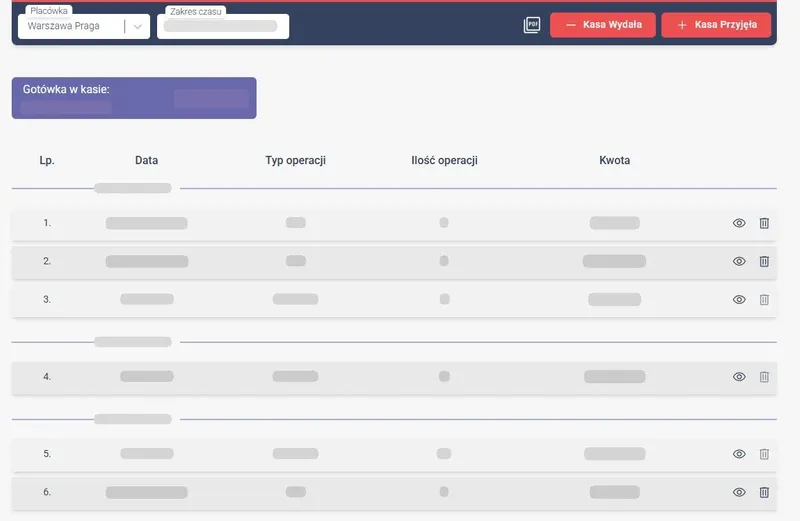
Cash desk module in Medbill: the clinic's cash balance, the Cash paid out and Cash received buttons, and KW and AUTO KP transactions grouped by day

The OpenMed team updates the medical price list and doctor profiles on its own

Medbill stores the data patients see on the OpenMed website: each clinic's price list and the doctor profiles. The website pulls them from the app, so the team changes them in one place.

In the price list a staff member picks the clinic and specialty, adds a service, sets a price or a price range and assigns a doctor. They can also add a note, for example that a consultation fee comes on top of the vaccine price. A single toggle decides whether the service is visible on the website.

A doctor's profile holds a photo, specialties, clinics, languages and a description. In the same form a staff member sets the URL of the doctor's page and the description search engines show in results, so they don't need to ask a developer for those SEO elements either. A profile can also be hidden with one click, and the data stays in the system.

When the changes are ready, the staff member clicks "Update openmed.pl" and the new data goes live on the website. Adding a doctor or changing a price now takes a minute and needs no ticket to the IT department.

One panel to manage clinics across the whole network

Medbill has separate roles for the front desk and administrators, and each person's access level follows from their daily duties. Every module starts with choosing a clinic, so the same system covers the work of a single front desk and the management of the whole network.

The team also manages language versions in the same panel. Price list categories, services and doctor descriptions have translations that a staff member fills in on a separate tab. The English version of the OpenMed website uses them, so it doesn't have to be maintained separately.
Front desk sales and the doctor's settlement use the same data.

A clinic's sales list in Medbill for one day: receipt number, doctor, services, the person who added the sale, price and a notice that the day is closed
01 The front desk adds a receipt at each visit, and the day's list shows who entered every sale. Once a day is closed, only administrators can change it.
A doctor's settlement as a PDF for a chosen period: revenue, commission, number of visits, costs, and the visits of a given day with time, price and commission
02 A doctor's settlement with no manual calculations. The system takes the commission rate from each service, lists the visits day by day and saves the statement as a PDF.

/ 03 technology and integrations

Technology choices

We wrote the panel in React and TypeScript as a single page application (SPA). The front desk doesn't wait for screens to load, because views switch without a page reload.

Application state is managed by Redux and Redux Thunk, and a separate code layer handles communication with the server. We also made sure views don't re-render unnecessarily, which keeps work in the panel smooth. The interface is responsive, meaning every feature also works on a phone.

We built the backend in Spring Boot, in Java. Data goes into relational Azure SQL databases, and caching layers cut the system's response times.

Everything runs in the Microsoft Azure cloud, which OpenMed was already using. Only OpenMed employees have access to Medbill, and each of them sees the modules they need for their work.

We connected analytics and monitoring tools to the app. They show us how the team uses the system and let us catch errors quickly. That is what guides Medbill's further development.

The clinics' websites pull data straight from Medbill

The websites fed by Medbill, including the OpenMed website we built, are generated statically with the Jamstack approach: ready-made page files are created in advance, not on every patient's visit. That makes the sites load fast and keeps them SEO-ready even though the data comes from the app. To get new data onto a site, all it takes is that site's update button in the panel. One click and an automated deployment process (CI/CD) builds and publishes a new version, with no developer involved.

The team manages the price list in Medbill, and patients see it on openmed.pl.

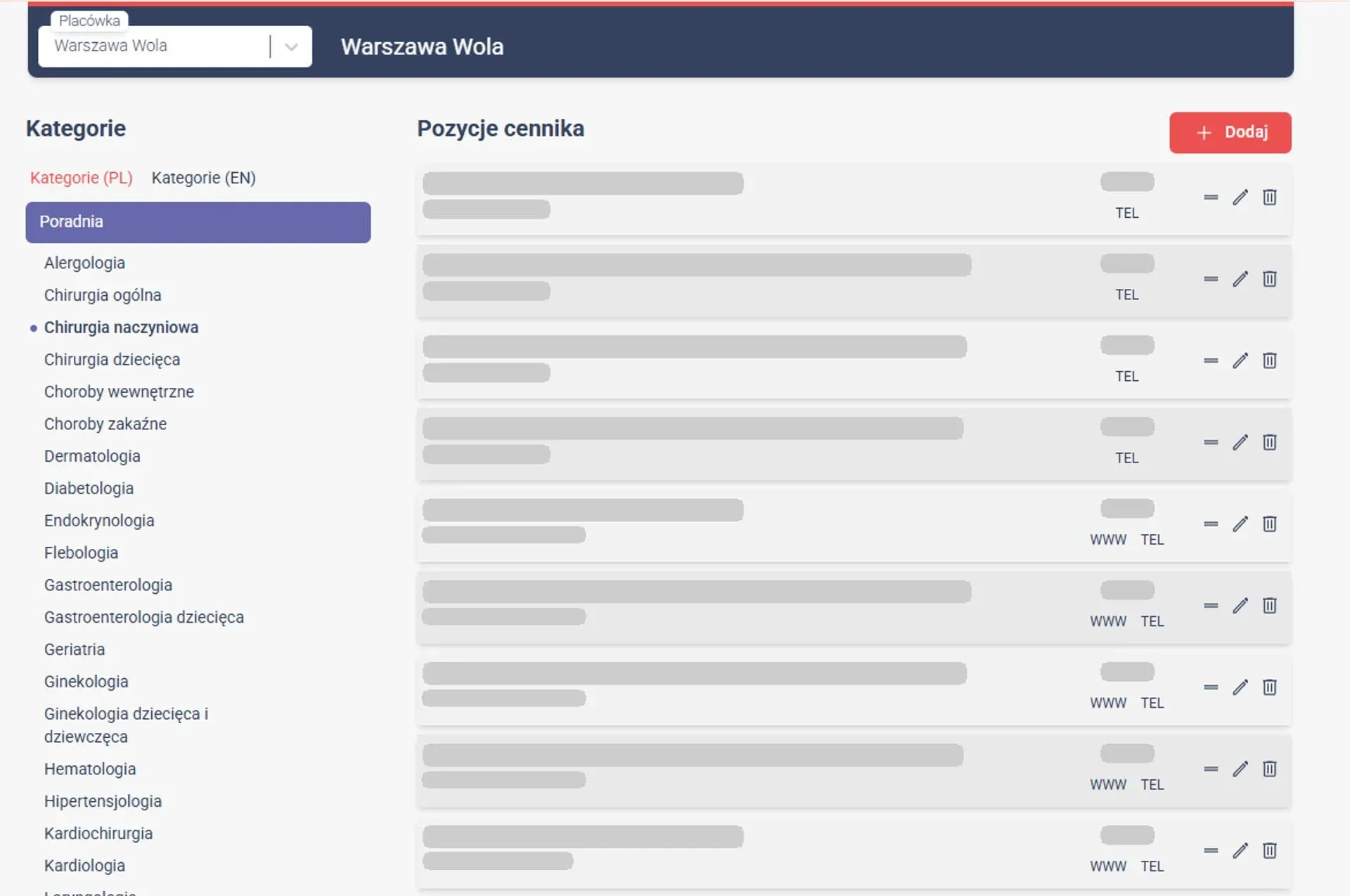
Price list module in Medbill: categories in Polish and English, specialties of the Warszawa Wola clinic, and items with a price, doctor and a WWW flag
03 Clinic staff add and change price list items themselves. After clicking "Update openmed.pl" the changes land in the price list on the website.
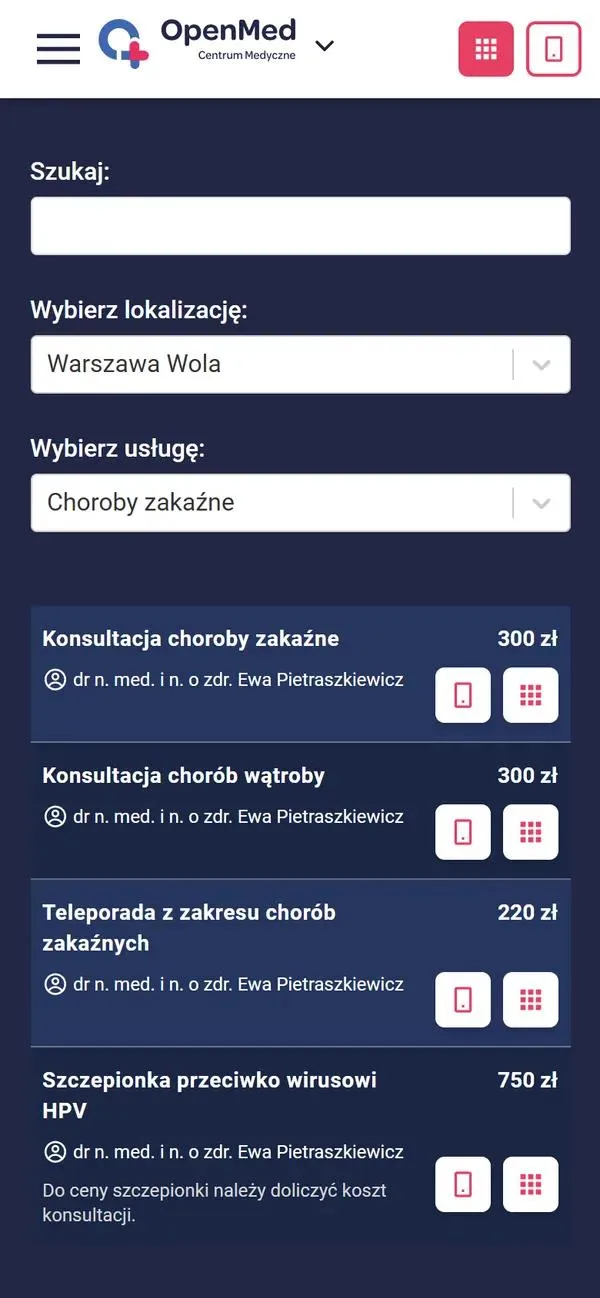
Price list on openmed.pl on mobile: the Warszawa Wola clinic, infectious diseases, services with a doctor and price, and a note next to the HPV vaccine
04 On openmed.pl patients see the price list with the categories, prices, doctors and notes entered in Medbill, so the website doesn't have to be edited separately.

Patients also see Medbill data in the English price list, on a doctor's profile and when booking an appointment.

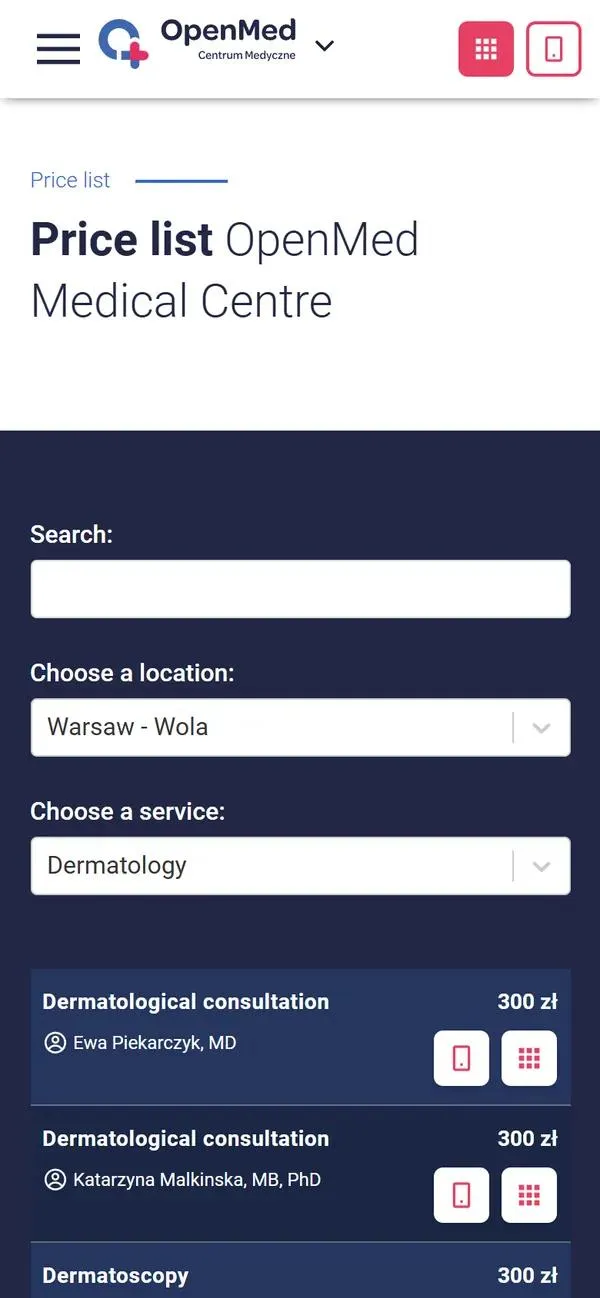
English price list on openmed.pl on mobile: the Warsaw - Wola clinic, dermatology, consultations with the doctor's name and price
05 The English price list uses the translations entered in Medbill. Patients from abroad see the same prices and doctors, and the team doesn't maintain a second price list.
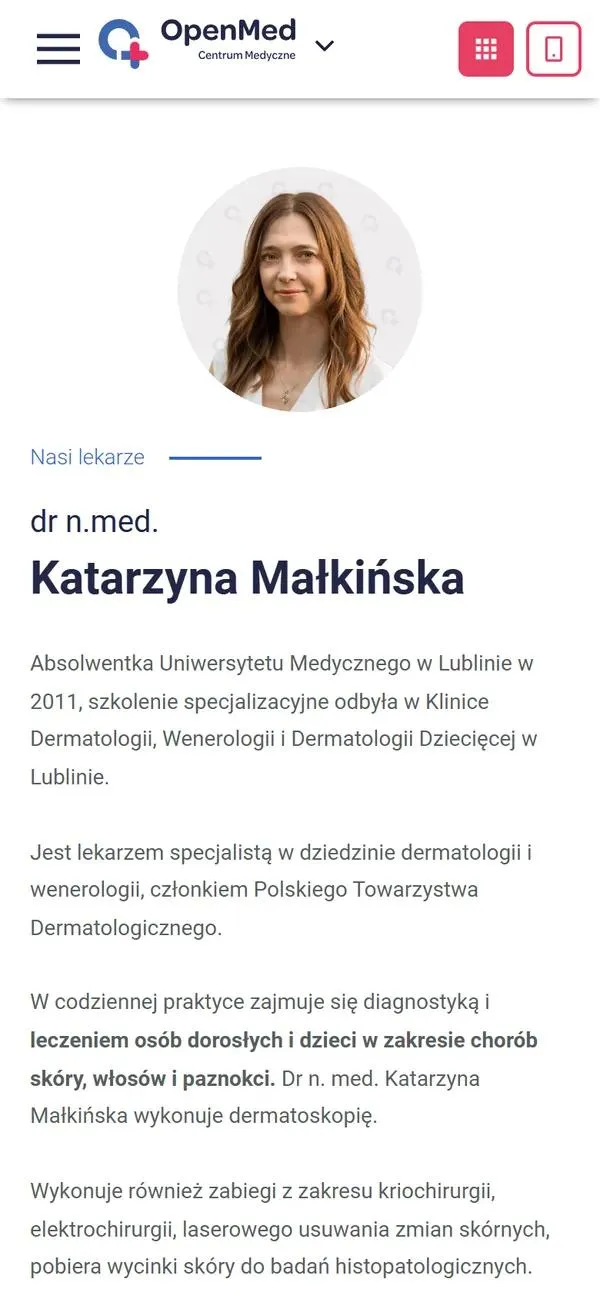
A doctor's profile on openmed.pl on mobile: photo, title, name, and a description of her education and areas of treatment
06 The OpenMed team enters the doctor's photo and description in Medbill. The website takes the specialties, clinics and languages from the same form.
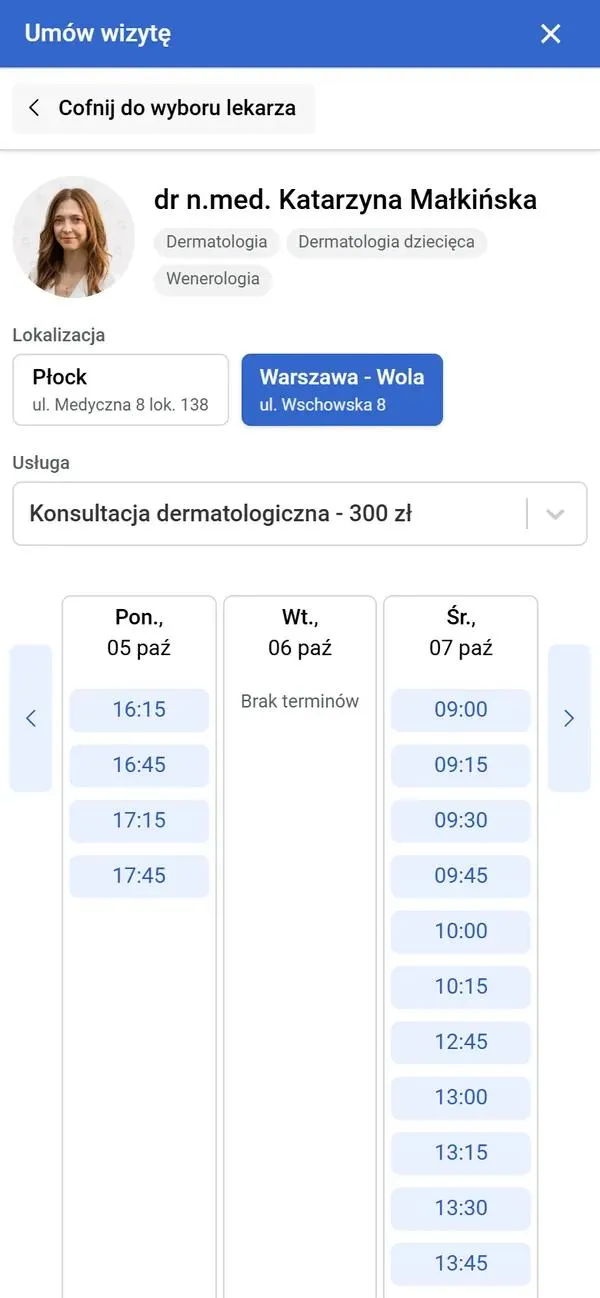
Booking window on openmed.pl: the doctor, specialties, clinic selection, a dermatology consultation for PLN 300 and available slots
07 The button next to a service in the price list opens booking with the same doctor, clinics and price. Patients immediately see available slots at the chosen clinic.

/ results

  • up to 50 % higher team operational efficiency

    the team's work before Medbill was launched

    after launching Medbill
    Source: project data

  • 99.98 % system availability (uptime)

    since the system launched
    Source: project data

  • up to 30 % lower IT team costs

    IT team costs before Medbill was launched

    after launching Medbill
    Source: project data

We compare the team's operational efficiency and IT team costs with the period before Medbill was launched. In both cases we quote the biggest improvement, not the average. The 99.98% availability is the share of time the system has been up since launch.

About the Client

Industry: Medical
Location: Poland - Warsaw and Płock
Company Size: 101-200
Founded: 2017

The OpenMed Group has several brands. OpenMed Centrum Medyczne runs three clinics: two in Warsaw, in Praga and Wola, and one in Płock. Patients there can choose from over 40 specialties, and the centers are an official partner of PZU Zdrowie.

The OpenMed Ginekologia i Położnictwo brand provides gynecology and obstetrics care. The OpenMed Recepty service lets patients get medical documents online, including e-prescriptions and sick leave certificates (L4).

Across the group there are over 100 specialist doctors. OpenMed is growing both in its clinics and online: it invests in marketing and in IT tools for patient communication.

Karol Sierpatowski - Board member

Karol Sierpatowski

Board member

"WebProfessor has supported the growth of our medical centers and our other business ventures on the technology side for over 5 years. In that time we have delivered a whole range of projects together, from websites, through systems that support the day-to-day operations of our clinics, to a portal for issuing medical documents.

What really sets the WebProfessor team apart is their high level of commitment, expert knowledge and the ability to turn complex business needs into functional, scalable technology that meets regulatory requirements.

WebProfessor has a very good understanding of the healthcare industry, both in terms of legal requirements and the real expectations of patients and staff.

I can wholeheartedly recommend them as a reliable, predictable and effective technology partner."

An app for medical centers should grow with the network

We have worked with OpenMed for over 5 years, and Medbill is not our only joint project with the group: we also co-develop OpenMed Recepty, where patients order e-prescriptions and sick leave certificates (L4). As part of our maintenance service we keep Medbill running and develop it continuously together with the group's team.

Since launch, a dozen or more specialties and services have been added to the system, and none of those changes required an architecture rebuild. The money OpenMed did not have to spend on rebuilds went into growing the business. That is how a custom web application for medical centers should work: it mirrors the way a specific network operates, and new modules and integrations come in when they are needed.

If you run several clinics and handle sales, the cash desk, settlements with doctors and the price list on your website in separate places, an app like this can bring them together in one panel.

/ questions

Questions people ask after reading this case study

Medbill is an internal app for running the OpenMed clinics, which we designed and launched together with the group's team. It is used by the front desk, administration and management, and only OpenMed employees have access to it. Medbill handles sales, the clinics' cash desks, settlements with doctors and statistics, as well as the price list and doctor profiles that feed the clinics' website.

The openmed.pl website pulls the price list and doctor profiles from Medbill. A staff member changes a price or adds a doctor in the panel and clicks the update button, and an automated deployment process builds and publishes a new version of the site. That is why a change takes a minute and doesn't need a developer.

The simplest way is to calculate them in the system from the sales the front desk enters. In Medbill every service has a doctor's commission rate, and the system totals revenue, commission, costs and the number of visits for a chosen doctor, clinic and period. The finished settlement can be downloaded as a PDF.

React and TypeScript in the panel, with Spring Boot (Java) and Azure SQL databases on the server. The app runs in the Microsoft Azure cloud. The panel is responsive, so it can also be used on a phone.

Yes. From the start we planned Medbill as a system developed in stages. A dozen or more new specialties and services have already been added, and the foundations of the architecture did not need to change. We add further modules as part of ongoing maintenance.

Yes. In Medbill every clinic has a cash desk module with the current cash balance and a list of transactions for a chosen period. Payments from sales go into the cash desk automatically as cash receipt documents (KP), while payouts and other deposits are added by staff manually. The statement can be downloaded as a PDF.

Yes, if you have several locations and want to manage sales, the cash desk, settlements and website content in one place. That could be a network of clinics, dental practices or rehabilitation centers. We design the modules and integrations around your company's processes.

So, shall
we begin?

Book a meeting